I am trying to measure the frequency a 0-14V pulsed output from a turbine flow meter and keep getting the 200284 Error. I am using the cDAQ 9178 chasis and a 9401 digital card and taking the signal in through the bnc connections on the chasis. I have tried the low freqency, high freqency and large frequency range options. I have also tried several different sample sizes from 1 up to 10M with no luck.
↧
DAQ Assistant sample size to avoid 200284 error
↧
PNP input to PCIe 6612
What is the easiest way to connect a PNP (current sinking) encoder to a counter-timer? I need to trigger some electronics using a PNP encoder, and it appears the 6612 counter-timer only accepts NPN (line driver) inputs. Is there an easy way to do this? I see several references that some NI cards can be configured for both PNP and NPN, but there is very little information on which ones and on the 6612.
↧
↧
Speeding up quadrature encoder read out
Hi,
I`m using a quadrature encoder together with a 6259 DAQ Card and BNC2110 Terminal Block.
I managed to have it working with the DAQ-Assistent at 80Mhz using the Counters and reading one value at a time. Before the DAQ-Assistent I used a DAQmx command to connect PFI10 and PFI9 as the BNC2110 Terminal only outputs PFI0-9. This works but it is really slow, the distance between each measurement point is around 6 us. The VI is in the attachement (AquadB_one_value.vi)
So I thought I might use the n-values version with the DAQ-Assistent but this does not work and I dont see any reason why, it is complaining about that connection between PFI10 and PFI9 which it didnt do before in the one-value-version. The VI is also in the attachement (AquadB_n_values.vi)
I also tried another method using a VI I was given some time ago and modified it but here the distance between each measurement point is also around 6us. This VI is also in the attachement (Counter - Read Encoder.vi)
Or am I missunderstanding something? The minimum achievable time distance between measurement points should be 1/80.000.000 s where of course the value can only differ 1/0/-1 because it has only calculated one new change in the A and B Signals right? I thought with using the n-values it is storing all the calculated values in the memory and I am transferring them afterwards for doing all the "post-processing"?
If I am wrong, how can I spped up the read-out of the calculated values any other way?
Best regards
↧
event counter misses events
The only posts I saw close to this are quite old and I didn't see any real solutions so....
I am using LabVIEW 2014 with a PXIe-6612 counter/timer to count fringes in a Michelson interferometer. I need to check the count so I can know the location of the travelling mirror. "Checking the count" means I send a pulse to the counter to dump the count to a buffer so it can be read. I noticed when I put a 3 ms delay in the loop that checks the counter, few if any error occurred in a short-duration count but if I let the loop go as fast as possible, or I kept the counter going for a long period of time (or worse, both), errors would always occur. Errors always manifested as a count that was too low - I was missing counts. Further checking showed that the slower I checked the counter, the fewer errors I had.
I am convinved now that this happens when the request to read the count coincides with the actual event arriving at the counter. Obviously, the more times the "read count" request is made, the higher the probability that there will be a collision with the actual event arriving at the counter. This is a hardware issue and the only fix I can see is to implement synchronous read requests that are separated from the actual event by some minimum time. I have done this and I now get zero errors. The question arises as to how one might get around the problem if the events are random, say in a photon-counting experiment. Does anyone know a workaround that allows you to count random events with zero errors (other than not checking the count)?
↧
Running 6 counters at the same time
I want to use 6 counters in NI PCIe-6612 at the same time to count pulses from 6 channeltrons, and I found that the counters miss some counts when I use TTL out of a function generator as a test source. For example, it shows ~40 counts in one second when I apply 60 Hz TTL pulse. The fluctuation is also quite large (~30%). When I use only one counter at a time, it reads more accurately, but still ~10% less counts than what it should be.. Is it possible that the computer cannot take the load since it's quite old (about 8 years, Pentium 4 with 1GB RAM).
↧
↧
Absolut timing/ triggering of CI pulse time
Hi,
I am fairly new to NI-DAQmx and trying to measure the length and absolute position of digital pulses (high times and low times) relative to a second trigger signal.
The VI CI Pulse Time allows me to measure the low and high times, but I can not get the absolute timing in relation to the trigger signal. The relevant code part so far is attached below. The generation of the trigger signal is not shown, but working correctly. Nicely visible on the oscilloscope.
I was using CI Period in another situation and I could set the variable CI.CtrTimebaseSrc to my trigger signal in order to only measure during the high of the trigger signal. What is the reason this is not working with CI Pulse Time?
Thank you very much,
Teresa
↧
counter is not ready
Hi,
I am trying to use a counter out from NI 6221 and change the output frequency of TTL waveform on the fly. I have used examples from NI and I figured out I need to use property node of " Couter ready for new value". It is working fine when I am changing frequency but at the moment I set frequency= 0 (Counter says zero is not valid so I set the minimum value which is 0.009313226) the counter does not accept any new value. Basically counter would not get ready for any new value and I have to stop the loop and start it over.
I am wondering if any of you has any idea to reslove this issue,
Thanks,
Saridar
↧
Ni7842 FPGA RIO board loop rate
Hi,
Is it possible to achieve a loop rate of 1us with the Ni7842 RIO board. It has an onboard clock of 40MHz. I have tried the following approaches to achieve a 1us loop rate and generate a single pulse of 1us duration, but wasn't successful.

1st approach: The above flat sequence was originally with 2 frames, I removed the second processing frame to reduce any possible processing delays and changed counter units to usec with a count of 1. This did not work, minimum pulse width I could generate was 1ms.
2nd approach: I changed counter units to ticks with a count of 40. This also was able to generate a min pulse width of 1ms only.
The AO channel is capable of 1MS/s update rate and with an onboard clock of 40Mhz you would think you can achieve 1us. Why is it being so difficult for me? Please help.
Thanks,
PG
↧
74161 RCO ENT cascade issue
Hi all,
I am building a simulation of an old 70s design based on 74161s and I have had a lot of trouble getting a set of counters to operate according to my expectations.
In my search for understanding more I discovered a recent document that had identified an error in the 74161 multisim model related to the counter executing on falling edge of clock, should be rising edge . Unfortunately it did not solve my headache.
Essentially I have three 74161s in cascade - the RCO for the first counter nicely carries over via ENT to trigger the second counter (ENP is high). But, when the second counter's RCO carries over to the third counters ENT it stays high for a long period of time (the duration of the QA) and sets off the third counter to "race at clock speed" similar to the first counter. When I do the same thing but instead carry over to ENP (having ENT high all the time) the counters work as expected.
The old schematics I use as a base, as well as all cascade counter reading I have come across indicates RCO should connect with ENT and not ENP – then again reading the 74161 datasheet it states that RCO stays high during the duration of QA.
Question to the forum: is the model for 74161 in multsim even more incorrect than the clock edge issue or is my “three cascaded counter” design incorrect? Please find attached the multisim model.
Unfortunately my multisim file is saved as .ms13 which is not allowed for forum upload, so I have attached a jpg of schematics and simulation results instead.
I appreciate any insights.
br /mattias
↧
↧
ctr0 retriggerable
Hi,I'm new to NI-DAQ. I have a board named PCIE-6321,I want to generate pulse-train with dev1/ctr0,but i want to change the frequency of the pulse-train sometime,How can I do it with C++;here are my code which i have try ,but it dosen't work.how can I do ?please help me,thank you .
↧
use AO0 generate nagetive pulse-train
hi , i have a board pcie6321 ,and i want to generate nagetive pulse-train,such as the -5v square wave ,here is my code ,but it dosen't work ,it seems that the wave just have -500mv,how can I do to accomplish it?
↧
NI 6602 frequency change How to
Hello!
I would like to use the NI 6602 Counter in other frequency base than 80MHz, I have read about it, but still couldn't figure out how to do that. I know that I need an other counter to set the frequency then measure with the second counter, which frequency's I have set. Is there any done example for that? or can you help me in this question? Thanks in advance.
Balint
↧
Upgrading from Legacy code to C# - need help configuring counter input and output channels
I am in the process of upgrading some legacy Visual C++ 6 code that was programmed against the NI PCI-6034e card. The card that was identified by NI as an equivalent replacment is the NI PCIe-6321 card. There is upstream hardware that is not being replaced or reconfigured, so this card was identified as providing the same functionality and I/O as the older NI card.
I am trying to figure out how to program the onboard counter input/output using the latest NIDAQ .NET 4.5 libraries (C#) to achieve the same functionality as the legacy code.
Here is the legacy code for the Counter 0 configuration:
// Reset the counter for programming. GPCTR_Control(m_iDevice, ND_COUNTER_0, ND_RESET), "Reset GPCTR0" );
// Set General purpose counter #0 to use pulse-train count. GPCTR_Set_Application(m_iDevice, ND_COUNTER_0, ND_ PULSE_TRAIN_GNR);
// Set General purpose counter #0 to count using the PFI6 pin. GPCTR_Change_Parameter(m_iDevice, ND_COUNTER_0, ND _SOURCE, ND_PFI_6);
// Make sure the counting is on low to high transitions of the PFI6 signal pin. GPCTR_Change_Parameter(m_iDevice, ND_COUNTER_0, ND _SOURCE_POLARITY, ND_LOW_TO_HIGH);
// Generate first pulse after m_GPCTR0_Value pulses. GPCTR_Change_Parameter(m_iDevice, ND_COUNTER_0, ND_COUNT_1, m_GPCTR0_Value);
// Generate second pulse after next m_GPCTR0_Value pulses. GPCTR_Change_Parameter(m_iDevice, ND_COUNTER_0, ND_COUNT_2, m_GPCTR0_Value);
// When count reaches zero, pulse the counter output signal pin. GPCTR_Change_Parameter(m_iDevice, ND_COUNTER_0, ND _OUTPUT_MODE, ND_TOGGLE);
// General purpose counter #0 will count down whenDIO6 is low. GPCTR_Change_Parameter(m_iDevice, ND_COUNTER_0, ND _UP_DOWN, ND_HARDWARE);
// Load the settings into the counter and arm it. GPCTR_Control(m_iDevice, ND_COUNTER_0, ND_PROGRAM);
My analysis of this code is that in current NIDAQmx programming, I have to create both a CIChannel task, and a COChannel task.
I have figured out that the CIChannel should be:
- Count Edges Counter
- CountEdgesTerminal = PFI6
- CountEdgesActiveEdge = low to high
What I am struggling with is how to program the coordination between the CIChannel and the COChannel. From the documentation of the legacy NIDAQ library, I think that the logic of the legacy code is that for every "m_GPCTR0_Value" pulses of the PFI6 signal being counted by the counter input, the counter output sends out either the high value or the low value of its output signal. The CIChannel needs to count down from "m_GPCTR0_Value" to 0, then signal the COChannel to output the correct state, then start counting down again from "m_GPCTR0_Value" to 0. I believe this is a continuous operation that starts when the signal on Digital Input #6 goes "Low", and stops when it goes back "High".
I am new to having to interface with hardware down to this level, so I may be completely missing something in my interpretation of the legacy operation.
I would appreciate any help that can be offered.
Thanks,
Elaine Visner
↧
↧
Retriggerable gated counter or analog pulse trains
Hi all,
I have a problem I could not resolve in the last days. It might be even a question of creativity of how to come up with a solution.
I have an external pulse train 1 at ca. 8 kHz (frequency not fully stable). With this pulse train, I want to trigger with each pulse an analog waveform. Using X-series boards, this works perfectly.
But now I want to gate this analog signal with another pulse train 2 that is much slower than the other one (pausetrig option). Theoretically, this works nicely, too. But in reality, the analog signal simply ends at the point where it is stopped by the pause trigger, whereas I want it to stop at the end point of the waveform.
Please have a look at the drawing attached
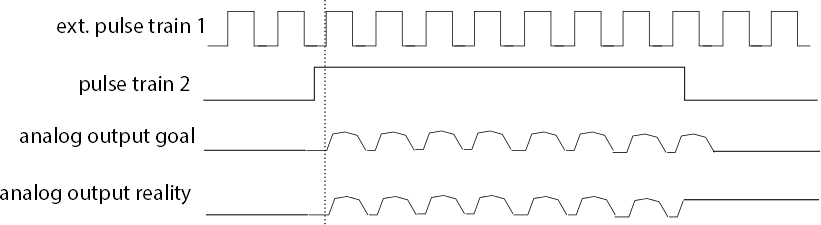
I would be really glad about any ideas on how to solve this problem.
Best regards,
Peter
↧
using an analog sinusoidal waveform as clock signal
I was wondering if it is possible to use a sinusoidal waveform as clock signal on the PCIe 6321 card and how it is done in LabWindows. I would like to sample my analog input on the peaks of the sinusoidal waveform. Could you please help me out?!
↧
Why does my linear encoder only read negative?
I have a linear encoder I am trying to utilize with an NI cDAQ 9184 & 9401. I basically used the linear encoder example I found here on the NI website, however, when I run the program I am finding that only measuring in one direction is the displacement reading accurate. By that I mean when my encoder is moving upward (in actuality my fixture is moving down and the encoder is fixed) I am measuring displacement correctly, but when moving in the opposite direction I am way off. I am not off a linear amount either, very different each time. Sometimes when the movement first starts it almost seems like the device is resetting back to initial position (0") but I am clueless as to why. Does anyone have any idea on how to rectify this situation?
I am fairly confident I have things wired correctly as this same encoder/setup reads correctly in MAX, see the second screen shot.
↧
Help with PCI-6602 gated counters
I'm trying to help a researcher get a PCI-6602 working as a four channel gated counter. They want to read and reset the counters at about 350hz, putting the
readings in a buffer to get a continuous stream of readings.
We've used the Counter-Continuous Output.vi to generate a 350 hz pulse output that he wants to use as a gate or sample clock on counter7. Works like a
charm. Wired that across the terminal block to Counter0 gate.
Not so much luck with input examples. I've been trying to get Counter - Count Edges (Continuous Clock).vi to work. Even with valid input channels
configured, it fails with error code -201298 (see dialog shot). I can get it to run by changing the boolean input to the DAQmx property
CI.CountEdges.CountReset.Enable from TRUE to FALSE. Then it at least counts, but just totalizes pulses continuously without resetting. Close, but no
cigar. Haven't found any combination of input channels etc that will make it run with the boolean set TRUE. Makes me nervous when hardware example code fails right off the bat.
The 6602 manual describes the action we want in the section on Duplicate Count Prevention, but gives no hint as to how one would achieve this with
DAQmx. Anybody have any useful suggestions? Answer might also help the person who posted "Running 6 counters at the same time"
↧
↧
Counting pulses using PCI 6602
↧
Edge counting using nicaiu.dll
I am trying to create an edge counter by directly calling the functions in nicaiu.dll from VB.NET. I am able to read the counter value OK but the counts always return back to the original value set when I created the channel. For example, I create the counter task using DAQmxCreateCICountEdgesChan and set the initial count to 100000. I then read the counter using DAQmxReadCounterScalarU32. The count changes when I turn the encoder wired to the counter channel but returns to 100000 after the encoder stops moving.
The wiring is correct because this works correctly using the Counter I/O Test Panel in NI-MAX. The count increases as I turn the encoder and never resets when the encoder stops moving.
Eventually I will need to get this working using DAQmxCreateCILinEncoderChan but I'm seeing the same behavior when I use that channel type. For now, I'm using DAQmxCreateCICountEdgesChan since it is more straight-forward and mimics the function in the NI-MAX Test Panel.
I have made this work using the DAQmx .NET API. However, there are errors when my application runs on a computer with a different version of NI-DAQmx than what was used when the application was compiled. Calling the DLL directly seems to eliminate the problems with different DAQmx versions.
Any idea what I am missing?
Public Class Form1
Private Declare Function DAQmxCreateTask Lib "nicaiu.dll" (ByVal TaskName As String, ByRef NITaskHandle As IntPtr) As Integer
Private Declare Function DAQmxCreateCICountEdgesChan Lib "nicaiu.dll" (ByVal TaskHandle As IntPtr, ByVal PhysicalChannel As String, ByVal NameToAssignToChannel As String, ByVal Edge As Integer, ByVal InitialCount As UInteger, ByVal CountDirection As Integer) As Integer
Private Declare Function DAQmxReadCounterScalarU32 Lib "nicaiu.dll" (ByVal TaskHandle As IntPtr, ByVal Timeout As Double, ByRef ReadVal As UInteger, ByVal Reserved As IntPtr) As Integer
Private Const DAQmx_Val_Rising = 10280
Private Const DAQmx_Val_Falling = 10171
Private Const DAQmx_Val_CountUp = 10128
Private Const DAQmx_Val_CountDown = 10124
Private Const DAQmx_Val_ExtControlled = 10326
Private TaskHandle As IntPtr
Private Const STARTCOUNT = 100000
Private Const DEVICECHAN = "DEV1/CTR0"
Private Sub Form1_Load(sender As Object, e As EventArgs) Handles MyBase.Load
Dim ErrVal As Integer
ErrVal = DAQmxCreateTask("ENCODER", TaskHandle)
Debug.WriteLineIf(ErrVal <> 0, "Error " & ErrVal.ToString)
ErrVal = DAQmxCreateCICountEdgesChan(TaskHandle, DEVICECHAN, "ENCODER", DAQmx_Val_Rising, STARTCOUNT, DAQmx_Val_CountUp)
Debug.WriteLineIf(ErrVal <> 0, "Error " & ErrVal.ToString)
End Sub
Private Sub Timer1_Tick(sender As Object, e As EventArgs) Handles Timer1.Tick
Dim ErrVal As Integer
Dim InVal As UInteger
ErrVal = DAQmxReadCounterScalarU32(TaskHandle, 0, InVal, Nothing)
Debug.WriteLineIf(ErrVal <> 0, "Error " & ErrVal.ToString)
Label1.Text = InVal.ToString
End Sub
End Class
↧
Count Digital Events with Pause Trigger [ Count only for certain no. of triggers ]
Hi All,
I have PCIe 6320 and I am currently using "count digital events with pause trigger". If I only want to count for 5 trigger, how should I do? Thanks,
↧